Skip to content
  • Homepage
  • HTML
  • CSS
  • Symfony
  • PHP
  • How to
  • Contact
  • Donate

Teach Developer

Articles, Guides & Tips

How to Delete Unused Database Tables in WordPress

Home  »  Wordpress • How to   »   How to Delete Unused Database Tables in WordPress
Posted on September 14, 2022September 17, 2022
904

Use the following steps to remove or delete unused tables from database in WordPress using plugins garbage collector:

  • Step 1 – Add Plugins Garbage Collector
  • Step 2 – Active Plugins Garbage Collector
  • Step 3 – Search Unused Tables From Database
  • Step 4 – Remove or Delete Unused Tables

Step 1 – Add Plugins Garbage Collector

Open your WordPress dashboard and navigate to “Plugins -> Add new.” Search for the “Plugins Garbage Collector” plugin. From the search results, install and activate the plugin.

Step 2 – Active Plugins Garbage Collector

Then navigate to Plugins menu and active “plugins garbage collector” plugin.

Step 3 – Search Unused Tables From Database

After that, Navigate “Tools -> Plugins Garbage Collector” page, select the “Search non-WP tables” radio option, and click on the “Scan Database” button.

After completing the scan, the plugin will display all the database tables that are not related to the core of WordPress or any of the installed plugins. Generally, these are the tables that are left over after deleting a plugin.
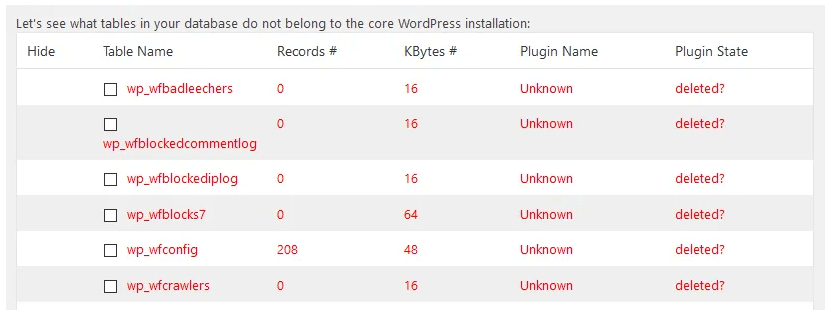
Step 4 – Remove or Delete Unused Tables

There is no select all option. So select manually and table will delete from database.

Conclusion

Through this tutorial, we have learned how to delete or remove unused tables from the database in WordPress using plugins garbage collector.

Wordpress, How to Tags:PHP

Post navigation

Previous Post: How to Delete and Remove Files on Ubuntu Linux Terminal
Next Post: How to Use useLocation Hook in React Router DOM V6

Related Posts

  • How to check if a customer is logged in to Magento 2 or not?
  • How to PHP Get Max Value From Array
  • How to Object Destructuring in ES6
  • Enable or Disable SSH Root Login Access in Linux
  • How to Recover Deleted WhatsApp Messages
  • How to Delete and Remove Files on Ubuntu Linux Terminal

Categories

  • Codeigniter (3)
  • CSS (11)
  • eCommerce (1)
  • Framework (1)
  • Git (3)
  • How to (43)
  • HTML (5)
  • JavaScript (15)
  • Jquery (7)
  • Laravel (1)
  • Linux (4)
  • Magento-2 (1)
  • Node js (4)
  • Others (2)
  • PHP (11)
  • React (13)
  • Server (1)
  • SSH (3)
  • Symfony (6)
  • Tips (16)
  • Top Tutorials (10)
  • Ubuntu (3)
  • Vue (1)
  • Wordpress (7)

Latest Posts

  • What is SSH in Linux?
  • How to Delete Files in Ubuntu Command Line
  • How to Deploy a React application on a cPanel
  • How to use events listeners and Event Subscriber in Symfony
  • How to Convert PHP CSV to JSON

WEEKLY TAGS

AJAX (1) Codeigniter (1) Javascript (11) JQuery (1) PHP (16) Programming (1) React (3) Symfony (1)

Random Post

Difference between var, let, and const in JavaScript
How to Create Live Search in HTML table with jQuery
How to Disable WordPress Auto Update? Turn Off WordPress Auto Updates
How to Delete Unused Database Tables in WordPress
How to fix getFullyear() is not a function with JavaScript?

Quick Navigation

  • About
  • Contact
  • Privacy Policy

© Teach Developer 2021. All rights reserved