Skip to content
  • Homepage
  • HTML
  • CSS
  • Symfony
  • PHP
  • How to
  • Contact
  • Donate

Teach Developer

Articles, Guides & Tips

How to check the PHP version

Home  »  How to • PHP • Tips   »   How to check the PHP version
Posted on July 25, 2022July 25, 2022 No Comments on How to check the PHP version
1,148

Newer PHP versions come with more features and improvements while deprecating some obsolete features. Old PHP codes might not work with more recent PHP versions and vice versa. It is, therefore, essential to use the correct PHP version for your code.
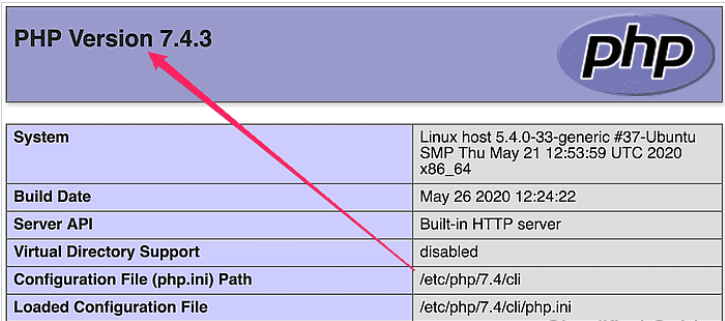
You can check the PHP version on your system by running the php command from the command line. There are also some PHP functions that you can use in your code to get the PHP version during runtime.

Steps to check the installed PHP version:

  1. Run php -v from the command line.
    $ php -v 
    PHP 7.4.3 (cli) (built: May 26 2020 12:24:22) ( NTS ) Copyright (c) The PHP Group Zend Engine v3.4.0, Copyright (c) Zend Technologies with Zend OPcache v7.4.3, Copyright (c), by Zend Technologies
  2. Run php -i from the command line.
$ php -i | grep "PHP Version"
PHP Version => 7.4.3

3. Print PHP_VERSION_ID from PHP script.

<?php 
	echo PHP_VERSION_ID;
	//Sample output: 70403
?>

4. Print phpversion() output from PHP script.

<?php 
	echo phpversion();
	//Sample output: 7.4.3
?>

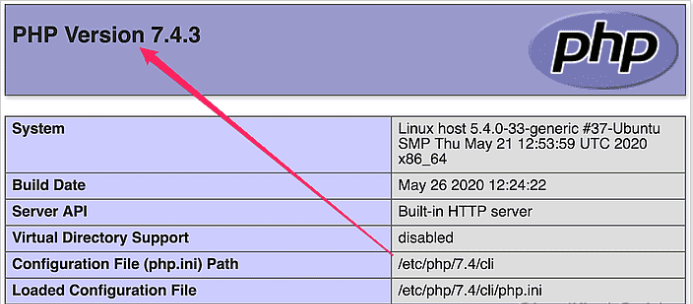
5. View from phpinfo() output.

<?php 
	phpinfo();
?>
How to, PHP, Tips Tags:PHP

Post navigation

Previous Post: How to use setTimeout and setInterval methods in JavaScript
Next Post: 4 Methods to Search an Array

Related Posts

  • How to Create Live Search in HTML table with jQuery
  • How to Deploy or Host your ReactJS App in cPanel
  • How to remove index.php from URL in CodeIgniter 4
  • How to Search Recently Modified Files in Linux
  • How to Deploy a React application on a cPanel
  • How to trigger a button click from another button click event with JavaScript?

Leave a Reply Cancel reply

Your email address will not be published. Required fields are marked *

Categories

  • Codeigniter (3)
  • CSS (11)
  • eCommerce (1)
  • Framework (1)
  • Git (3)
  • How to (43)
  • HTML (5)
  • JavaScript (15)
  • Jquery (7)
  • Laravel (1)
  • Linux (4)
  • Magento-2 (1)
  • Node js (4)
  • Others (2)
  • PHP (11)
  • React (13)
  • Server (1)
  • SSH (3)
  • Symfony (6)
  • Tips (16)
  • Top Tutorials (10)
  • Ubuntu (3)
  • Vue (1)
  • Wordpress (7)

Latest Posts

  • What is SSH in Linux?
  • How to Delete Files in Ubuntu Command Line
  • How to Deploy a React application on a cPanel
  • How to use events listeners and Event Subscriber in Symfony
  • How to Convert PHP CSV to JSON

WEEKLY TAGS

AJAX (1) Codeigniter (1) Javascript (11) JQuery (1) PHP (16) Programming (1) React (3) Symfony (1)

Random Post

How to split a string into an array with Twig
How To Install Nginx, PHP on Ubuntu 22.04
How to Symfony Request
How to Define Global Variables for Twig Templates in Symfony 6
How to Search Recently Modified Files in Linux

Quick Navigation

  • About
  • Contact
  • Privacy Policy

© Teach Developer 2021. All rights reserved